


@chrisko, first of all heartfelt thanks for this great software!
I use inches for my gcode. Here in the USA many components and tooling are in inches, and inch gcode uses 4 decimal places--nnn.nnnn.
However, the DXF2GCODE interface only uses 2 decimal places--perfectly reasonable for millimeter gcode. But this causes a problem which requires me to do search-and-replace in a text editor.
I am using DXF2GCODE for a drag knife. Cutting self-adhesive vinyl, my cut depth is -.0150" and my swivel (slice) depth is -.0050". Unfortunately both show up as -.01 in the interface
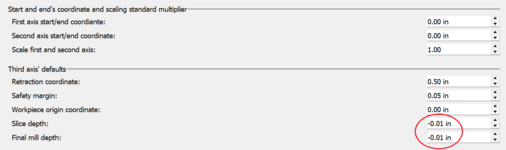
This is transmitted to the gcode, and I need to use the text editor to change all the Z-0.0100 to Z-0.0150. My current cutting does not need to use the slice depth, or that would be a bigger problem. I would need to set a mill depth of, say, -.0200" so that I could distinguish it from the slice depth when I edit the gcode file.
I would much appreciate a fix to this interface problem!
I use inches for my gcode. Here in the USA many components and tooling are in inches, and inch gcode uses 4 decimal places--nnn.nnnn.
However, the DXF2GCODE interface only uses 2 decimal places--perfectly reasonable for millimeter gcode. But this causes a problem which requires me to do search-and-replace in a text editor.
I am using DXF2GCODE for a drag knife. Cutting self-adhesive vinyl, my cut depth is -.0150" and my swivel (slice) depth is -.0050". Unfortunately both show up as -.01 in the interface
This is transmitted to the gcode, and I need to use the text editor to change all the Z-0.0100 to Z-0.0150. My current cutting does not need to use the slice depth, or that would be a bigger problem. I would need to set a mill depth of, say, -.0200" so that I could distinguish it from the slice depth when I edit the gcode file.
I would much appreciate a fix to this interface problem!
Zuletzt bearbeitet:


